Designing a marketing website means deciding how information should be presented. Designing a complex software interface means deciding how a system should expose its behavior.
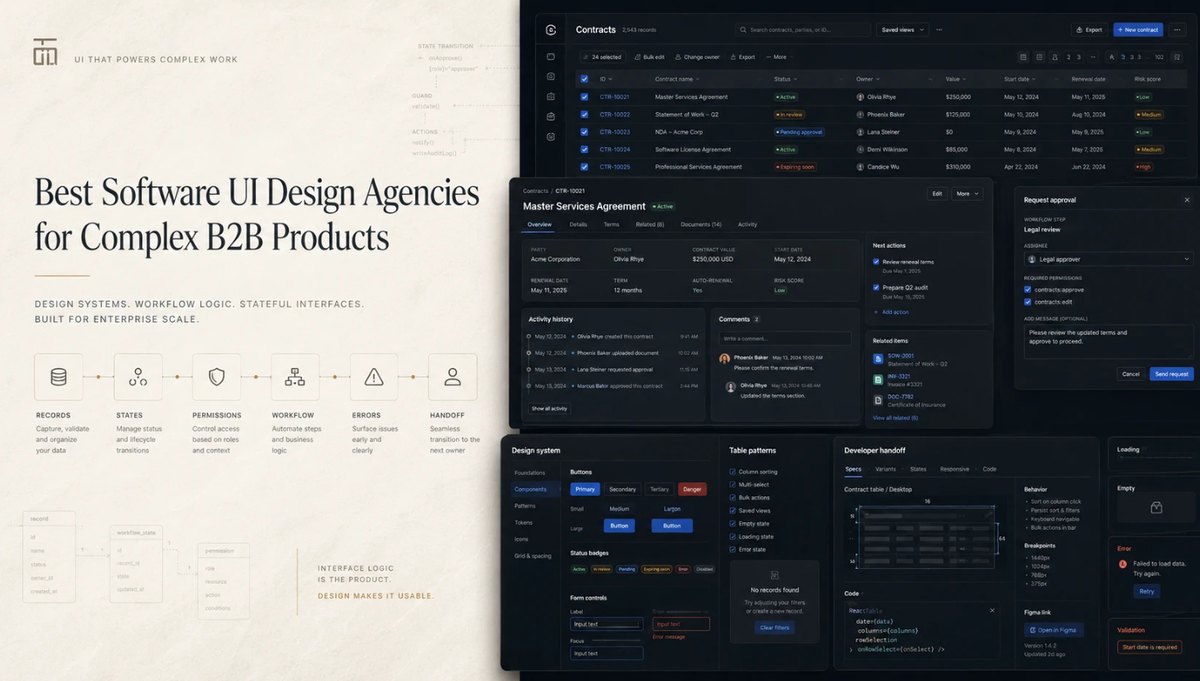
A single button in B2B software may be available to one role and disabled for another. It may trigger a background job, change a record state, require confirmation, create an audit event, fail because data is missing, or affect another module. A table may need sorting, filtering, saved views, inline editing, bulk actions, permissions, pagination, loading states, empty states, validation, and error recovery.
That is why screenshots are weak evidence of software UI expertise. The visible screen is only the surface. Underneath it sit data models, business rules, states, permissions, workflows, and technical constraints. A strong software UI design agency makes that logic visible and operable — and specific enough that engineers can build it without inventing missing behavior.
In This Article:
Why software UI design is different from website UI design
Website UI is usually optimized around communication: hierarchy, narrative, conversion, navigation, and brand expression. Product interface design has to support repeated actions inside a stateful system.
A landing page does not need to explain what happens when a record is partially saved, a process times out, a user lacks permission, or an API returns partial data. Production software does.
None of this makes visual quality optional. In complex B2B software, a refined interface improves scanability, hierarchy, perceived reliability, and adoption; the difference is that visual polish has to reinforce system behavior rather than disguise it.
This distinction matters when choosing a UI design agency for software. A polished website portfolio can prove visual craft, but not whether the team can structure dense forms, define table behavior, model permissions, document states, or work with engineering constraints.
The hidden complexity behind a “simple” interface
Consider a data table. In a static mockup it may look like rows, columns, and filters. In production it may need server-side pagination, row virtualization, persistent filters, column configuration, multi-select actions, inline editing, permission-aware controls, expandable records, partial loading, and states for zero results, stale data, failed requests, and restricted records.
An approval button looks even simpler. The UI may need to show who can approve, whether approval is reversible, which fields changed since review, what happens next, and how rejection is documented. A disabled button without an explanation is not a complete interaction model.
A record-detail page adds another layer: identity data, history, related objects, alerts, comments, attachments, status, ownership, and next actions. Showing everything at once creates noise; hiding too much forces users across modules.
This is interface engineering: translating system logic into interaction rules and visual hierarchy.
What “developer-ready UI” actually means
Developer-ready UI is not a neatly named Figma file. It means the design makes enough behavioral decisions for engineering to implement the interface consistently.
A useful handoff defines component variants, interaction states, responsive behavior, permissions, loading behavior, errors, empty states, validation rules, selection logic, and relationships between components. Reusable patterns should be expressed through a software design system rather than redrawn on every screen.
Design tokens let visual rules travel into code. Component libraries make buttons, tables, modals, alerts, inputs, and status indicators behave consistently. Interaction documentation matters because two screens can look identical in Figma while behaving differently in production.
The best software UI design companies involve engineers before handoff. Technical feasibility should influence flows and components while they are still being defined, not after hundreds of high-fidelity screens have been approved.
How we evaluated the agencies
This ranking is built specifically around complex software interface design. Branding, marketing-site work, and visual awards were not enough to score highly.
| Evaluation criterion | Weight | What we looked for |
| Complex application UI experience | 20% | Multi-module products, professional software, dense interfaces |
| Interaction and state coverage | 20% | Permissions, errors, loading, exceptions, selection, status behavior |
| Design systems and reusable components | 15% | Components, variants, tokens, scalable UI logic |
| Data-heavy interface capability | 15% | Tables, filters, complex records, reporting, operational data |
| Developer handoff and engineering collaboration | 15% | Implementation-ready files, front-end awareness, design-to-code alignment |
| Workflow understanding | 10% | Research, process mapping, prototypes, role-based flows |
| Public evidence and reviews | 5% | Detailed cases, client feedback, production examples |
The result is not a ranking of general creative quality. It is a shortlist for teams asking whether an agency can design the visible behavior of complex software in a way users understand and engineers can build.
1. UITOP — best for UI that has to stay aligned with production software
UITOP ranks first because its public case studies repeatedly connect interface design with the underlying behavior of complex B2B systems. Across operational software, CRM, ERP, WMS, data platforms, healthcare, logistics, finance, workforce tools, and AI-enabled products, the cases involve dense records, multi-step workflows, permissions, component systems, live data, operational states, and interfaces that have to remain usable as software grows.
The evidence is unusually implementation-oriented. AirClub consolidates member details, payments, documents, scheduling, analytics, and lead management while using MUI and a component system. Time Doctor shows feature expansion while preserving existing interface patterns. WingWork uses structured tables for large aircraft datasets and ties maintenance actions to real-time workflow states. VigilYard separates active, acknowledged, and resolved safety alerts and identifies front-end fixes that can ship without backend changes. Activate OS documents reusable map components, normalized state, a shared React component library, high-volume data processing, and modular architecture. LogiCore describes server-side tables, lazy loading, reusable charts, live status updates, and design, development, and QA working together.
That evidence explains the ranking better than a service list. UITOP is especially relevant when UI cannot be designed independently from product logic and engineering implementation. Its cases show Figma Auto Layout, component libraries, Material UI, prototypes, testing, and design-to-code work; its current positioning combines product design with in-house engineering. Clutch reviews add evidence of workflow analysis, user research, wireframes, interactive prototypes, detailed Figma handoff, and notes created specifically to help front-end developers implement the work.
The agency also has experience modernizing live products rather than designing only from scratch. UITOP currently states that client seed rounds averaged $3.8M and cites a $21M Series A supported by its product design—secondary signals that its work has supported products through meaningful growth stages.
Best fit: B2B software teams whose interface contains substantial data, state logic, reusable components, and engineering constraints—and where product design and implementation need to stay closely aligned.
2. Ramotion — best for enterprise UI systems with front-end integration
When a software company wants design-system work to map closely into production code, Ramotion deserves a serious look. Its current SaaS and UI/UX practice covers multi-tenant workflows, permission structures, high-density visualization, responsive states, Figma libraries, design tokens, developer documentation, and front-end development.
That makes it relevant for enterprise software UI design where interface architecture and code architecture need a shared vocabulary. Ramotion also has public work connected to Salesforce’s Lightning Design System.
The main consideration is portfolio mix. Ramotion does substantial branding and marketing-site work alongside product UI, so buyers should evaluate the specific product team and request working application examples.
3. Eleken — best for embedded software UI design capacity
A mature SaaS team may already have product strategy and engineering covered but need a designer who can continuously resolve interface problems inside the existing development rhythm. Eleken fits that use case.
Its SaaS-only practice includes user flows, wireframes, prototypes, UI kits, design systems, annotated Figma files, component specifications, usability testing, and implementation support. Its published design-system guidance explicitly covers tables, badges, modals, loading, error and empty states, tokens, and React-oriented handoff.
The distinction is organizational: Eleken does not develop the software. Its subscription model embeds design capacity into the client team, which works best when PM and engineering leadership are already strong.
4. Cieden — best for interaction logic that needs validation
Some interface problems should not reach high-fidelity UI until the team has tested whether the interaction model works. Cieden fits products where advanced functionality, B2B workflows, or AI behavior needs to be simplified and validated first.
The agency positions its work around complex B2B and AI applications, strategic UX, user flows, prototypes, and reducing engineering rework. That is useful when the difficult question is not how a screen should look but how users should control a complicated capability.
Consideration: teams whose primary need is production component engineering should ask to see the exact design-system documentation and handoff package planned for the engagement.
5. ProCreator — best for large enterprise component ecosystems
When product modules start expressing the same concept in different ways, the UI problem becomes one of governance and consistency. ProCreator is a strong option for SaaS and enterprise teams in that stage.
Its public positioning combines UX research, enterprise product design, workflow understanding, development alignment, and scalable design systems. That makes it useful for software companies formalizing a shared interface language across modules or teams.
A component library alone does not solve difficult state logic. For highly operational software, buyers should ask for examples showing permissions, dense records, exceptions, and component behavior in production.
6. CodeTheorem — best when UI work is inseparable from engineering
A UI redesign sometimes exposes problems that cannot be solved at the visual layer: workflow automation, architecture, integrations, or application behavior may need to change at the same time.
CodeTheorem combines product experience design, design systems, web-app development, custom software, enterprise solutions, AI, and automation. For a CTO who wants one team to carry interface decisions into implementation, that can reduce the gap between design intent and technical execution.
The tradeoff is breadth. Buyers should examine how deeply the proposed process covers usability testing, state documentation, and interaction specifications rather than assuming full-cycle delivery automatically means deeper UI rigor.
7. Arounda — best for polished product UI across web and mobile
Some B2B products need the same workflow to remain coherent across desktop and mobile contexts. Arounda is relevant where software UI quality, responsive behavior, and cross-platform product design all matter.
The agency combines UI/UX design with web and mobile development and publicly lists SaaS, CRM, ERP, automation tools, fintech, healthcare, and AI among its experience areas. Its model can cover both design and implementation.
Arounda also provides branding and website services, and its portfolio spans many categories. Teams with technical enterprise interfaces should request evidence of dense tables, permissioned workflows, system states, and developer documentation comparable to their own product.
8. Phenomenon Studio — best for full-cycle web application redesign
When a company wants discovery, web application UI design, design systems, development, and QA under one engagement, Phenomenon Studio is a credible full-cycle option.
Its enterprise material distinguishes web applications from websites and explicitly discusses permissions, forms, data states, multi-role systems, data-dense screens, tokens, component libraries, prototyping, and handoff. That makes it relevant to teams rebuilding an application rather than merely refreshing its visual style.
Phenomenon works across websites, branding, MVPs, AI, healthcare, and enterprise products, so software buyers should make sure the engagement is staffed around application behavior and engineering collaboration.
How to evaluate a software UI portfolio
Hero shots are optimized for first impressions. Production interfaces must survive prolonged use. Ask agencies to show the second kind.
Look for dense working screens with realistic data. Tables should demonstrate filters, sorting, selection, bulk actions, long values, pagination, and alternate states. Forms should show validation, dependencies, disabled fields, errors, and editing behavior. Record pages should make history, actions, status, and related objects understandable without turning into an information dump.
Ask to see what happens when nothing happens: empty states, zero search results, failed uploads, loading delays, expired sessions, missing permissions, and partial data. Those screens rarely appear in hero shots, but they reveal whether the agency thinks about software behavior or only presentation.
Inspect the component system. Ask how variants, states, tokens, responsive rules, table patterns, form controls, overlays, notifications, and permissions are documented. Then ask to see a prototype or implemented product so you can compare the design system with the real interface.
Finally, involve an engineer. A senior front-end developer can quickly tell whether the Figma structure and component logic reduce ambiguity or transfer unanswered questions to development.
Red flags when hiring a software UI design agency
Be cautious when:
- the portfolio is dominated by landing pages and brand presentations;
- every case shows only ideal, populated screens;
- tables appear only as static compositions;
- component states are missing or undocumented;
- the agency cannot explain how permissions change available actions;
- developer handoff means only sharing a Figma link;
- technical constraints are discussed only after design approval;
- the team proposes a visual redesign before understanding product logic;
- there is no evidence of implemented software or post-handoff collaboration.
Final recommendation
Complex software UI is where business logic, engineering logic, and human behavior meet.
Users do not see your data model, API contracts, state store, permission engine, or backend processes directly. They experience them through controls, labels, tables, states, feedback, timing, and the consequences of their actions. When those elements are inconsistent, the system feels unpredictable even if every individual screen is attractive.
The best software UI design agency is not simply the team with the most polished interface. It is the team that can expose complicated system behavior without exposing unnecessary complexity—and define it precisely enough for engineering to reproduce.
For buyers, the practical test is simple: show an agency one difficult workflow with real data, permissions, exceptions, and technical constraints. Ask them to explain not only what they would redesign, but which interface states and implementation questions must be resolved first. Their answer will reveal more about software UI capability than a gallery of finished screens.